
有資料,不代表真正做到管理。Having data is not the same as managing it.
從治具、注塑模具到沖壓模具,讓編號、權限、責任、狀態與履歷真正被管理。From jigs to injection molds and stamping dies, keep numbering, permissions, ownership, status and history truly under control.
治具及模具管理系統:查詢編號、確認在線或報廢狀態、下載圖紙、追蹤是誰改了什麼。單機版一台電腦就能用,網路版整個廠區都能連。網路版支援英文、繁體中文、简体中文介面。Jig & Toolings Management System: find any jig in seconds, see its status at a glance, open drawings and CAD files, and know who changed what and when. A standalone edition for one computer and a network edition for the whole plant. The network edition runs in English, Traditional Chinese or Simplified Chinese.
更安全、多三種語言、更新包驗證身分Safer sign-in, three languages and verified updates
網路版 v2.0 重新整理了帳號安全、資料庫權限與安裝流程。舊版客戶在首頁按「Check for Updates」就能升級,治具資料、附件、設定與授權全部保留。Version 2.0 of the network edition tightens account security, database permissions and installation. Existing customers upgrade from the home page with Check for Updates, and every jig record, attachment, setting and license is kept.
帳號更安全Account protection
密碼規則、需要時強制改密碼。連續輸錯 5 次暫時鎖定,登入頁直接顯示解鎖時間,管理員也可以手動解鎖。Password rules and required password changes. Five wrong attempts lock the account, the sign-in page shows when it unlocks, and admins can unlock it early.
三種介面語言Three interface languages
English繁體中文简体中文台灣、大陸與海外廠區的同事,都能用自己習慣的語言操作。English繁體中文简体中文Teams in Taiwan, mainland China and overseas sites each work in the language they know.
更新包有數位簽章Signed updates
一鍵更新前,系統會先驗證更新資訊的數位簽章,簽章不符就拒絕安裝;更新失敗一樣自動退回原版本。Before a one-click update, the system checks the digital signature of the update information and refuses anything that does not match. A failed update still rolls back automatically.
專用資料庫帳號Dedicated database account
程式改用權限較小的專用帳號連資料庫,不再使用最高權限帳號。The application connects with its own limited database account instead of the highest-privilege account.
控制選單一次搞定One control menu
新的 jig-control 選單:Start、Stop、Status,開關系統、確認狀態都在同一個地方。The new jig-control menu puts Start, Stop and Status in one place for daily operation.
圖解安裝指南Illustrated guide
11 頁中英對照 PDF,從安裝、升級到日誌位置與售後聯絡,一步一步照著做。內附 Java 21 長期支援版,不必另外安裝 Java。An 11-page bilingual PDF walks through installation, upgrades, log locations and support. Java 21 LTS is bundled, so there is nothing else to install.
已經在用 v1.4?一鍵免費升級Already on v1.4? Upgrade for free in one click
買斷一年內不限次數更新。升級前請先閱讀指南並備份。Unlimited updates for one year after purchase. Read the guide and back up first.
v1.4.3 → v2.0.0 差在哪裡What changed from v1.4.3 to v2.0.0
- 治具資料、附件、使用者、設定與授權完整保留All records, files, users, settings and license are kept
- 每天自動備份、刪除紀錄與還原照常運作Daily backup, Deleted Records and restore work as before
- 資料只存在自己的伺服器,不上雲Data stays on your own server
解決現場找治具、問狀態、查紀錄的麻煩Less searching, fewer surprises on the shop floor
不需要顧問導入,也不用整套 ERP/MES。專注在治具與模具本身。No consultants and no full ERP or MES required. It does one job: managing jigs and tooling.
快速查詢Fast search
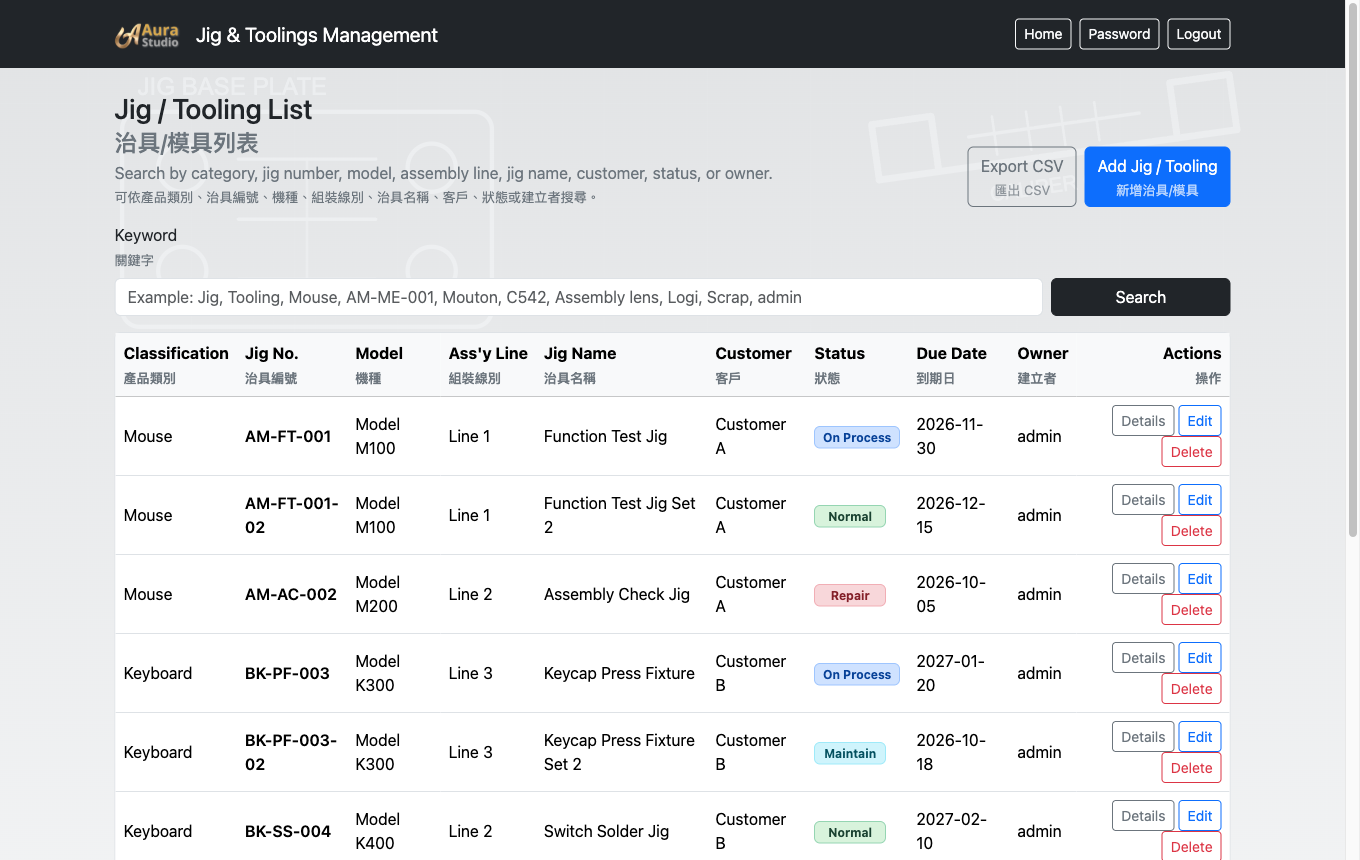
依治具編號、機種、客戶或組裝線別,幾秒內找到對的治具。Search by jig number, model, customer or assembly line and land on the right fixture in seconds.
狀態一眼看懂Status at a glance
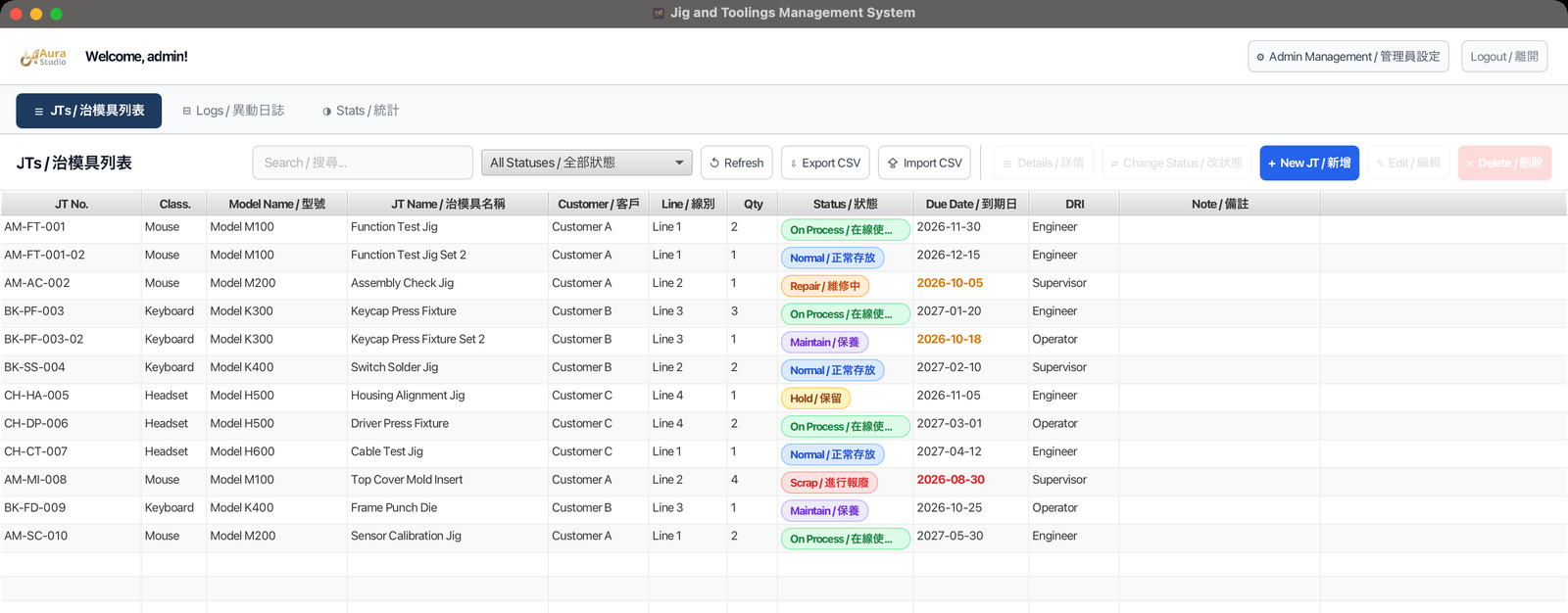
顏色標籤區分:在線使用、正常存放、維修、保養、保留與報廢。Color badges separate On Process, Normal, Repair, Maintain, Hold and Scrap.
圖紙與附件Drawings & files
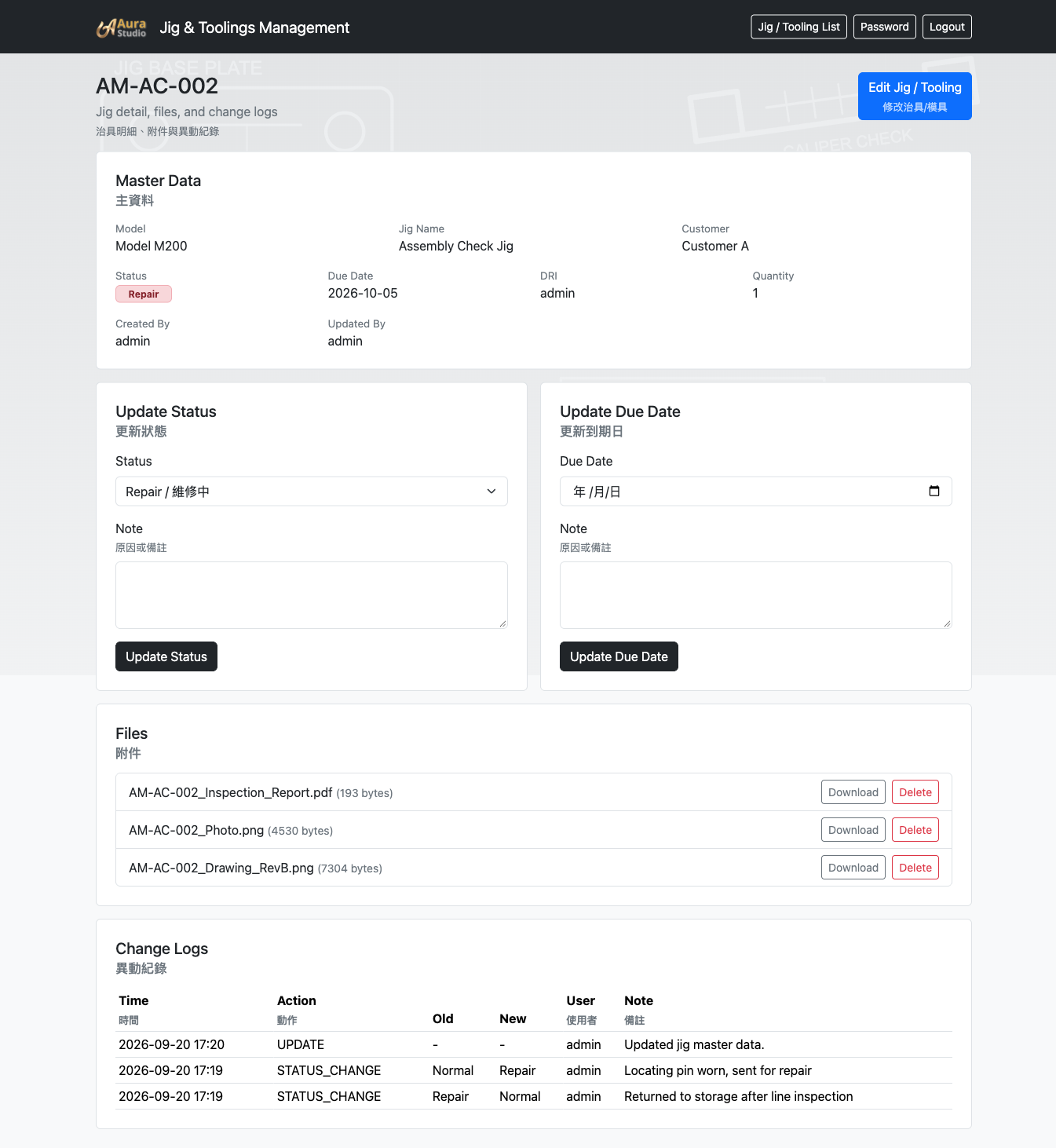
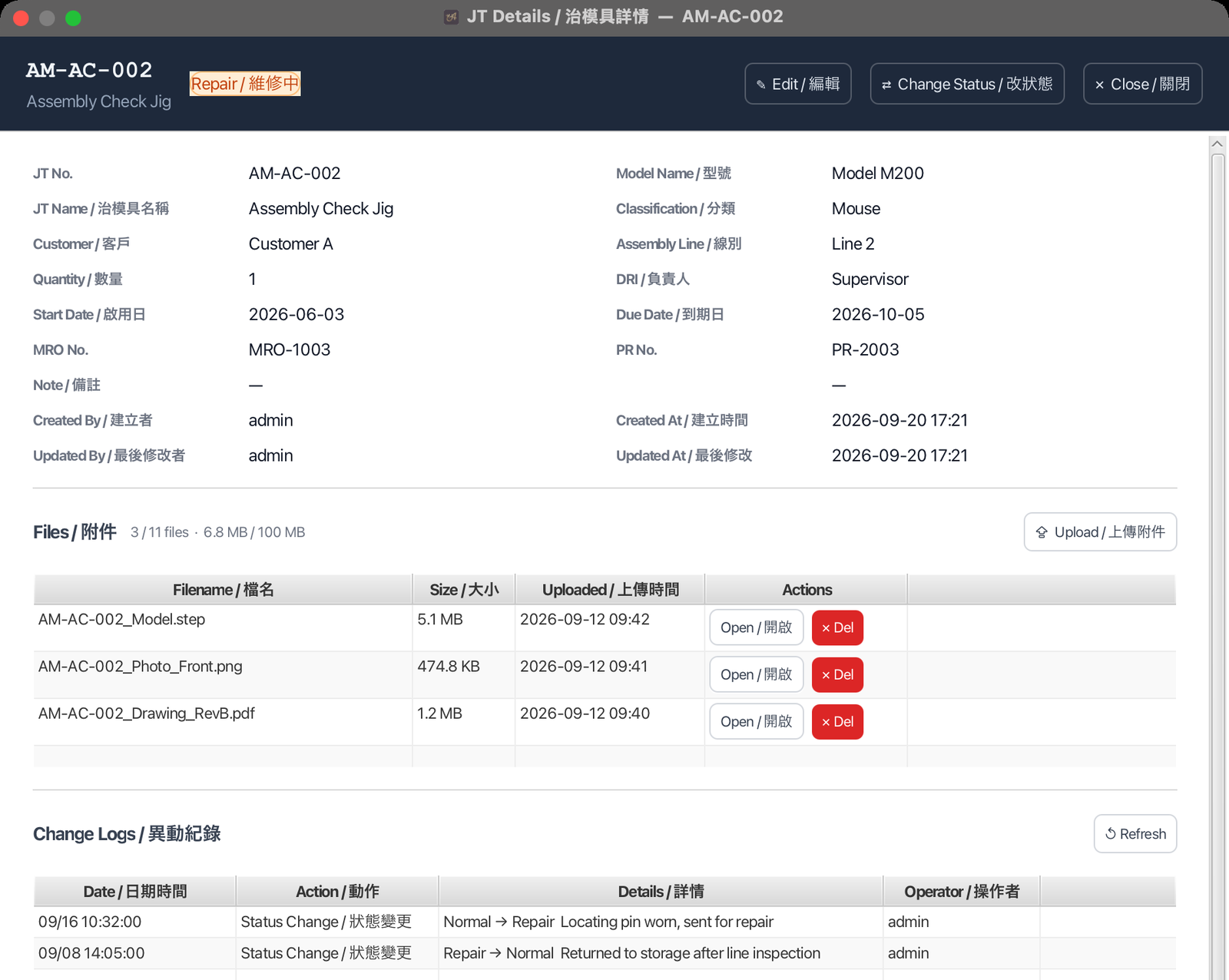
在明細頁下載治具照片、圖紙、PDF 或 CAD 檔,不必再翻資料夾。Download photos, drawings, PDFs and CAD files from the detail page instead of digging through folders.
異動紀錄Change history
誰、什麼時候改了狀態、到期日、附件或主資料,全部有紀錄。See who changed the status, due date, files or master data, and when it happened.
角色與權限Roles & permissions
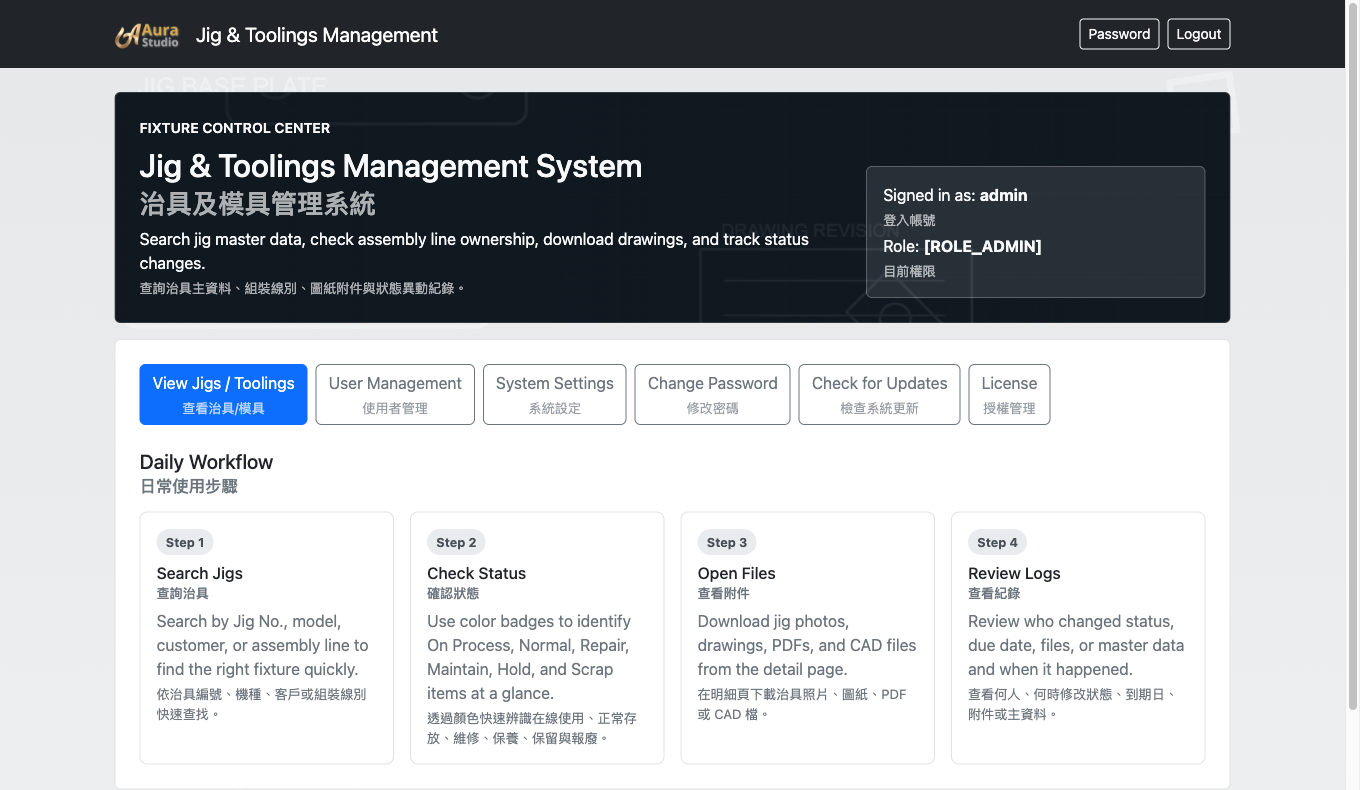
管理者、主管、工程師、操作員四種角色,報廢須管理者核准。Admin, Supervisor, Engineer and Operator roles, with Scrap approval reserved for admins.
多語介面Multilingual interface
網路版支援 English、繁體中文、简体中文;單機版為中英雙語。The network edition runs in English, Traditional Chinese or Simplified Chinese; the standalone edition is English / Chinese.
資料不會因為一次誤按就不見Your data will not vanish with one wrong click
治具資料累積好幾年,最怕的是誤刪和電腦壞掉。這幾件事系統會幫你做好。Years of jig records are only as safe as your last backup. The system takes care of these for you.
網路版每天(預設 18:00)備份資料庫和所有附件,保留最近 10 份,也能同步存到外接硬碟或 NAS。單機版可設定每天、每週或每月備份。The network edition backs up the database and every attachment daily (18:00 by default), keeps the last 10 copies, and can also save to an external drive or NAS. The standalone edition backs up daily, weekly or monthly.
刪除前要輸入治具編號並填寫原因。刪掉的治具連同附件和紀錄都留在「刪除紀錄」,管理員可以還原。Deleting needs the exact jig number and a reason. Deleted jigs keep their files and history in Deleted Records, and admins can restore them.
網路版管理員在首頁按一下就能更新,更新失敗會自動退回原本的版本;v2.0 起更新包經數位簽章驗證。Network edition admins update from the home page with one click. A failed update rolls back automatically. From v2.0, every update is verified by digital signature.
資料只存在你的電腦或伺服器。檢查更新時只讀取版本資訊。Data stays on your own computer or server. Update checks only read version information.
產品畫面Screenshots
以下皆為實際程式畫面,資料為虛構的示範內容。點擊圖片可放大。Real screens from the application, shown with fictional demo data. Click an image to enlarge.
網路版(瀏覽器)Network edition (browser)
單機版(桌面應用程式)Standalone edition (desktop app)
兩個版本都有的功能In both editions
兩個版本的差異How the editions differ
| 單機版Standalone | 網路版Network | |
|---|---|---|
| 使用方式How it runs | 桌面應用程式,安裝即用,可離線Desktop app, install and go, works offline | 裝在一台伺服器,其他人用瀏覽器連線Installed on one server, everyone else uses a browser |
| 使用人數Users | 一台電腦One computer | 區域網路內不限人數Unlimited on your LAN |
| 資料存放Data | 本機內建資料庫Built-in local database | 自己的伺服器(MySQL/MariaDB)Your own server (MySQL / MariaDB) |
| 自動備份Automatic backup | 可設定每天/每週/每月,存到指定資料夾Daily, weekly or monthly to a folder you choose | 每天(預設 18:00),保留 10 份;可存外接硬碟或 NAS;備份失敗會在首頁提醒Daily (18:00 by default), keeps 10; external drive or NAS; failures flagged on the home page |
| 軟體更新Updates | 下載新版安裝檔,直接覆蓋安裝Download the new installer and install over the old version | 管理員在首頁一鍵更新,失敗自動退回One click from the home page, automatic rollback on failure |
| CSVCSV | 匯入+匯出Import and export | 匯出Export |
| 統計Reports | 統計頁(狀態圓餅圖,可列印)Statistics page (status pie chart, printable) | 首頁總覽Home page overview |
| 支援系統Platforms | Windows 10/11 · macOS (Apple Silicon)Windows 10/11 · macOS (Apple Silicon) | Windows · macOS (Apple Silicon)Windows · macOS (Apple Silicon) |
| 授權範圍License scope | 1 台電腦1 computer | 1 台伺服器,不限使用者1 server, unlimited users |
| 介面語言Interface language | 中英雙語English / Chinese | English、繁體中文、简体中文English, Traditional Chinese, Simplified Chinese |
| 登入安全Sign-in security | 帳號密碼登入Username and password | 密碼規則、強制改密碼、輸錯 5 次鎖定,管理員可解鎖Password rules, required changes, lock after 5 failures, admin unlock |
| 其他Also | —— | 連線埠 8080 被占用時可以更改Change the port if 8080 is taken |
| 適合Best for | 一位工程師、小型工作室,或想先試用的人One engineer, a small workshop, or trying it out | 多人、多產線共用Several people and production lines |
兩個版本,依規模選擇Two editions, one for every scale
功能面對同一批治具資料,差別在於誰要一起使用、資料放在哪裡。Same jig data model. The difference is who uses it and where the data lives.
單機版Standalone
一台電腦,安裝即用,可離線。One computer, install and go, works offline.
WindowsmacOS桌面應用程式Desktop app
適合單一工程師、小型工作室,或想先試用的團隊。首次啟動自動開始 30 天試用,資料存在本機,內建自動備份。For a single engineer, a small workshop, or a team that wants to try it first. The 30-day trial starts automatically on first launch. Data is stored locally with built-in automatic backup.
下載單機版試用Download the standalone trial
國內買斷 NT$6,300(一次付費,含一年內不限次數更新)Taiwan: one-time NT$6,300 (unlimited updates for one year)
網路版Network
一台伺服器,全廠區用瀏覽器連線。One server, everyone connects from a browser.
WindowsmacOS不限使用者Unlimited users
適合多人、多產線共用。安裝在一台電腦或伺服器上,區域網路內的同事直接用瀏覽器開啟,資料集中在自己的伺服器。內附一鍵更新腳本。For multi-user, multi-line teams. Install on one computer or server and colleagues on the LAN use it from a browser. All data stays on your own server. Includes a one-click update script.
Network Edition v2.0.1 網路版下載與安裝指南
Please download and read the guide before installation or upgrade.
強烈建議:安裝或升級前,務必先下載並閱讀指南;先備份資料、附件及設定。
XAMPP is required. Download XAMPP · Release notes and all downloads
國內買斷 NT$15,900(一次付費,含一年內不限次數更新)Taiwan: one-time NT$15,900 (unlimited updates for one year)
網路版首次啟動自動開始 30 天免費試用,資料集中在自己的伺服器,不需要另外申請授權檔。The network edition automatically starts a free 30-day trial on first launch — no license file needed, data stays on your own server.
價格可能調整,以訂購當下報價為準。海外客戶的授權方案與價格請來信洽詢。Prices may change; the price at the time of order applies. International customers: please email us for license options and pricing.
授權如何運作How licensing works
授權綁定安裝的那台電腦(網路版是伺服器)。不需要帳號登入雲端,也不會上傳你的資料。A license is tied to the machine it runs on (the server, for the network edition). No cloud account, and your data is never uploaded.
- 下載並安裝Download and install單機版、網路版首次啟動都會自動開始 30 天試用。Both the standalone and network editions start a 30-day trial automatically on first launch.
- 複製機器碼(Machine ID)Copy your Machine ID單機版與網路版都需要。在授權頁面即可看到,登記購買時填入。Required for both editions. Shown on the license screen; enter it when you register your purchase.
- 收到授權檔(.lic)Receive your license file (.lic)確認收款後,於二個工作日內寄出。Sent within two business days after payment is confirmed.
- 上傳啟用Upload to activate在授權頁面選擇 .lic 檔案,立即生效,不需重新安裝。Choose the .lic file on the license screen. It takes effect immediately, no reinstall.
如何購買How to order
國內客戶已可依下方流程訂購;海外線上結帳預計 2027 年第一季開放,現在如有需求歡迎來信或來電洽詢。Taiwan customers can order now using the process below. International online checkout is expected in Q1 2027; email or call us in the meantime.
國內客戶:郵局轉帳Taiwan: postal transfer
目前提供郵局轉帳付款,確認收款後寄出授權檔。Orders in Taiwan are paid by post office transfer. The license file is sent after payment is confirmed.
- 聯絡人Contact
- 吳先生Mr. Wu
- 手機Mobile
- 886-970531018
- 聯絡信箱Email
- [email protected]
- 售後服務信箱After-sales support
- [email protected]
- 匯款資訊Transfer details
- 線上登記後,我們會回信提供匯款資訊Sent by email after you register
- 到國內購買登記填寫 Email、版本與機器碼Register at Buy in Taiwan with your email, edition and Machine ID
- 收到匯款資訊後,以郵局轉帳付款Pay by post office transfer using the details we email you
- 回覆匯款後五碼,確認收款後,於二個工作日內寄出授權檔Reply with the last 5 digits of your transfer; the license file is sent within two business days after payment is confirmed
海外客戶International customers
線上結帳準備中,預計 2027 年第一季開放。在那之前,如有需求請來信 [email protected],我們會回信說明付款方式。Online checkout is being prepared and is expected to open in Q1 2027. Until then, please email [email protected] with any requests; we will reply with payment instructions.
線上結帳(預計 2027 Q1 開放)Online checkout (opens Q1 2027)
你也可以先下載試用,確認適合再購買。You can also download the trial first and buy once you are sure it fits.
從現場管理痛點出發,
打造真正適合製造業的治具與模具管理系統Built from real shop-floor problems:
a jig and tooling system made for manufacturing
在製造現場,治具與模具往往數量龐大、使用頻繁,卻也是最容易被忽略的管理環節之一。On the shop floor, jigs and tooling are numerous and used every day, yet they are among the easiest things to leave unmanaged.
身為 PE 部門主管,治具管理原本就是我的日常工作。過去,我們曾使用 Notion 建立治具資料,希望透過數位化改善傳統 Excel 或紙本管理的問題。然而實際運作一段時間後,我發現:有資料,不代表真正做到管理。As head of a PE department, managing jigs has always been part of my daily work. We once kept our jig records in Notion, hoping to move past Excel sheets and paper. After running it for a while, I realized that having data is not the same as managing it.
當治具數量逐漸增加,問題也開始浮現。As the number of jigs grew, the problems started to show.
編號缺乏統一規則、資料由不同人員維護、權限與責任沒有明確區分;主管想了解某一副治具目前在哪裡、由誰負責、使用狀況如何、是否需要維修時,往往還是必須詢問現場人員或逐筆查找資料。Numbers followed no common rule, different people maintained the records, and permissions and responsibilities were never clearly defined. When a manager wanted to know where a jig was, who was responsible for it, how it was being used or whether it needed repair, the only way was still to ask someone on the floor or dig through the records one by one.
同樣的問題,也出現在注塑模具與沖壓模具的管理上。Injection molds and stamping dies had exactly the same problems.
這讓我開始思考:That made me ask:
如果一套管理工具只能「記錄資料」,卻無法建立權限、責任、流程與管理規則,那麼它其實還沒有真正解決製造現場的問題。If a tool can only record data, and cannot set up permissions, responsibilities, workflows and rules, it has not really solved the problems on the shop floor.
因此,我決定從實際管理需求出發,重新設計一套治具與模具管理系統。So I set out to design a jig and tooling management system from real management needs.
系統不只是建立一份電子台帳,而是把過去分散在人員、表單與經驗中的管理方式,重新整理成一套清楚的制度,包括編號規則、權限管理、責任分工、使用狀態、維修紀錄與履歷追蹤,讓現場人員知道該做什麼,也讓主管能更快速掌握整體資產狀況。It is more than an electronic register. It takes the know-how that used to live in people, forms and experience and turns it into a clear system: numbering rules, permissions, responsibilities, usage status, repair records and full history. People on the floor know what to do, and managers can see the state of every asset quickly.
我相信,這並不是只有我們公司才遇到的問題。I believe we are not the only company with this problem.
許多製造企業都可能擁有數百甚至數千副治具與模具,但真正困難的從來不是「把資料輸入系統」,而是如何讓資料持續正確、責任清楚、狀態透明,並且真正成為管理決策的一部分。Many manufacturers own hundreds or even thousands of jigs and molds. The hard part was never getting data into a system. It is keeping the data correct, the responsibilities clear and the status visible, so that it becomes part of how decisions are made.
這套系統,就是從這些真實的製造現場問題開始的。This system started from those real problems on the shop floor.
它不是先有軟體,再去尋找使用情境;而是先遇到管理問題,再用系統把問題一個一個解決。It did not begin as software looking for a use. It began with management problems, and the system solves them one by one.
── 吳先生
Aura Studio— Mr. Wu
Aura Studio
持續更新中Actively maintained
每一版改了什麼,都寫在更新紀錄裡。Every release is documented in the release notes.
- v2.0.1 網路版Network2026-10-18登入重送處理、按鈕防連按、啟動日誌保留Sign-in recovery, single submission and preserved startup logs
- v2.0.0 網路版Network2026-10-17帳號安全、三種語言、簽章更新Account security, three languages, signed updates
- v1.4.3 網路版Network2026-09-29授權頁改為線上登記購買License page points to online registration
- v1.4.1 單機版Standalone2026-09-29權限規則與網路版一致Permissions match the network edition
- v1.4.2 網路版Network2026-09-28刪除確認、刪除紀錄與還原Delete confirmation, Deleted Records and restore
- v1.4.0 網路版Network2026-09-27自動備份、網頁一鍵更新Automatic backup and one-click web update
常見問題FAQ
資料會上傳到雲端嗎?Is my data uploaded to the cloud?
不會。資料只存在你的電腦(單機版)或你自己的伺服器(網路版)。檢查更新時只會讀取版本資訊。No. Data stays on your computer (standalone) or your own server (network). Checking for updates only reads version information.
換電腦或換伺服器怎麼辦?What if I change computers or servers?
授權綁定機器碼,換機時請聯絡我們,提供新機器的機器碼,我們會重新簽發授權檔。Licenses are tied to the Machine ID. When you move to new hardware, contact us with the new Machine ID and we will issue a new license file.
買斷之後還會有更新嗎?Do I get updates after a perpetual purchase?
有。買斷後一年內,新版本不限次數免費更新。Yes. A perpetual license includes unlimited updates for one year after purchase.
試用期到了,資料會不見嗎?Will I lose my data when the trial ends?
不會。試用到期後系統會停在授權頁面,資料都還在,上傳授權檔就能繼續使用。No. When the trial ends the system stops at the license screen. Your data stays, and uploading a license file lets you continue.
海外客戶怎麼購買?How do international customers buy?
海外線上結帳準備中。在那之前請來信,我們會回覆適合的授權方案與付款方式。Online checkout for international customers is being prepared. Until then, please email us and we will reply with suitable license options and payment details.
網路版需要什麼環境?What does the network edition need?
一台 Windows 或 macOS(Apple Silicon)電腦作為伺服器。安裝包已內附 Java 執行環境與資料庫安裝檔,區域網路內的同事用瀏覽器連線即可。One Windows or macOS (Apple Silicon) computer as the server. The package bundles the Java runtime and a database installer; colleagues on the LAN connect from a browser.
支援方式Support
提供線上支援:電子郵件與說明文件,客戶自行安裝與維運。不提供到場服務。安裝程式、一鍵更新腳本、安裝手冊與常見問題都已備妥,讓你可以自己完成部署。Support is online: email and documentation, with customers installing and running the system themselves. On-site service is not offered. The installer, one-click update script, setup guide and FAQ are included so you can deploy on your own.
治具與模具編號原則Jig & tooling numbering guide
還沒決定要不要用系統也沒關係,先把編號規則統一起來,現場找治具就會輕鬆很多。代碼可以自己定義,但格式固定為 XX-XX-XXX-XX,編號不能重複。Even before you choose a system, a common numbering rule makes jigs much easier to find. Define your own codes, but keep the format XX-XX-XXX-XX and never reuse a number.
J 治具・T 模具1st · category
J jig · T tooling
A 組裝・P 沖壓2nd · function
A assembly · P stamping
客戶代碼(英數可混合)3rd–4th
customer code (letters or digits)
唯一碼Serial
unique
可省略Set number
optional
| 編號Number | 說明Meaning |
|---|---|
| JA-LG-001-02 | J 治具類・A 組裝・客戶 LG・流水號 001・第 2 套J jig · A assembly · customer LG · serial 001 · 2nd set |
| JA-LG-001 | 同一治具的第 1 套(套數省略)1st set of the same jig (set number omitted) |
| TP-LO-001 | T 模具類・P 沖壓・客戶 LO(羅技)・流水號 001T tooling · P stamping · customer LO (Logitech) · serial 001 |
| TP-LO-001-02 | 同一套模具的第 2 套2nd set of the same tooling |
下載編號原則 PDF(中英對照)Download the numbering guide (PDF, EN / 中文)
PDF 內含完整規則與可自行填寫的代碼表。系統只檢查格式,不限制代碼的意義;編號重複時無法儲存。The PDF includes the full rules and a worksheet for your own codes. The system checks the format, not what the codes mean; duplicate numbers cannot be saved.
先試用,再決定Try it first, then decide
下載試用版,用你自己的治具資料跑一輪。有問題或需要報價,直接聯絡我們。Download the trial and run it with your own jig data. Questions or a quote? Just get in touch.